 View sample ↗
01 / Spatial context
Point-cloud cutaway
A view made from the captured points, with the overhead layer cut away to reveal the space below. Useful for relating the separate drawings back to the building.
Real scan points
Start with what’s there.
A space.
Full of possibility.
Photograph. Points. Plan. Now you see it.
Site-visit photography, a display sample spanning a merged floor cloud and linework from the original GA. The photo-to-cloud move is an editorial transition; the photo has no calibrated scanner-camera pose. Dimensions are calculated between GA column centres: 8,612, 8,613, 8,986 and 8,785 mm. The handwritten notes read “Windows, south-facing light”, “Mullions encased in aluminium cover” and “See Column Fit drawing”. These illustrate a review; material and orientation notes need project verification. Anonymised study, not a construction drawing.
T&I / Digital project work
Turning building scans into something a project team can use: a view of the space, a section through it, a record to refer back to.
We are developing this work within T&I. Commercial scanning bookings are not currently offered.
From the working data
These are real extracts from our derived data. Each shows a different way of understanding the same part of a building.
Anonymised, cropped study views. Project names, locations and identifying annotations have been removed. Examples only, not drawings for construction.
View sample ↗
01 / Spatial context
A view made from the captured points, with the overhead layer cut away to reveal the space below. Useful for relating the separate drawings back to the building.
Real scan points View sample ↗
02 / In plan
A narrow band through the cloud reveals the returns at one height. It gives the drawing process a visible source to check against, including gaps and obstructions.
Approx. 1.15 to 1.40 m above local floor View sample ↗
03 / Through the space
A vertical cut puts floor, structure and overhead returns in the same view. It helps explain relationships that a plan alone can miss.
A 600 mm deep band of scan data View sample ↗
04 / Looking overhead
A grid of observed overhead returns makes changes in height easier to see. Blank areas remain blank; this study does not establish minimum clearances.
Check the original plan
A scan-to-plan comparison shows where the recorded column positions differ. Checking the alignment helps separate a global shift from a local discrepancy.
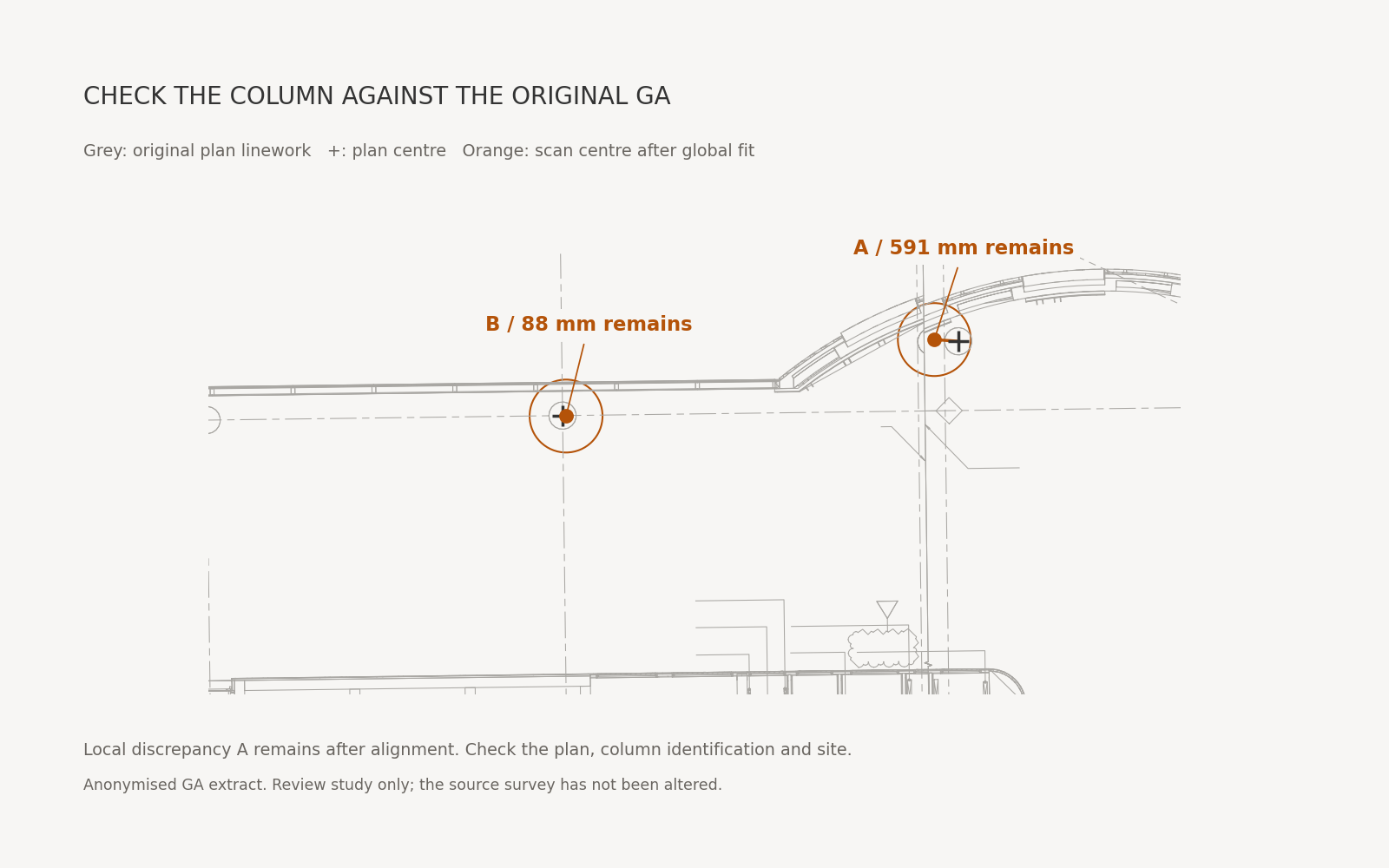
In this example, fitting 13 shared column positions removes a 0.566° rotation trend. The median remaining offset is 54 mm.
That is a focused check to take back to the original plan and the site. The alignment and column identification still need review before calling it a design or construction error.
Open the comparisonGrey linework and crosses come from the original GA. Orange points show the observed column centres after fitting the shared positions. This is a review study, not an approved setting-out check.

Explore an example
Switch between the studies to see how each view adds to the picture. These public samples show the kind of material being brought together in the project viewer.
A simple sample viewer. Project drawings and source files remain in their project spaces.
Horizontal slice / A narrow band through the captured points. Select the image to open it full size.
The working approach
The captured points provide the reference. Study views can be revisited as the project raises new questions.
Plans, sections and height studies isolate different parts of the scan. Interpretation and areas needing a check belong alongside the drawing.
The project viewer brings drawings, scan views and supporting files into one place for review, with revisions and limitations kept visible.
Work in development
TISCAN is a home for the scan-derived work being developed within T&I. This page shares examples of that work as the approach takes shape.